Marine Apps
The Marine variant of HaLOS includes a curated Marine App Store with applications for boat electronics, navigation, and data logging. These apps integrate with NMEA 2000, NMEA 0183, and other marine data protocols.
Overview
Install HaLOS with the Marine stack (see Choosing an Image) to get the Marine App Store. It appears alongside the standard container store in Cockpit and includes applications specifically selected for marine use.
Key marine apps available in the store:
- Signal K Server — Marine data hub for NMEA 2000 and NMEA 0183
- InfluxDB — Time-series database for logging sensor data
- Grafana — Dashboards and data visualization
- AvNav — Navigation and chart plotting
- OpenCPN — Full-featured chart plotter (desktop app, also available as an experimental container)
Signal K Server
URL: https://halos.local/signalk-server/
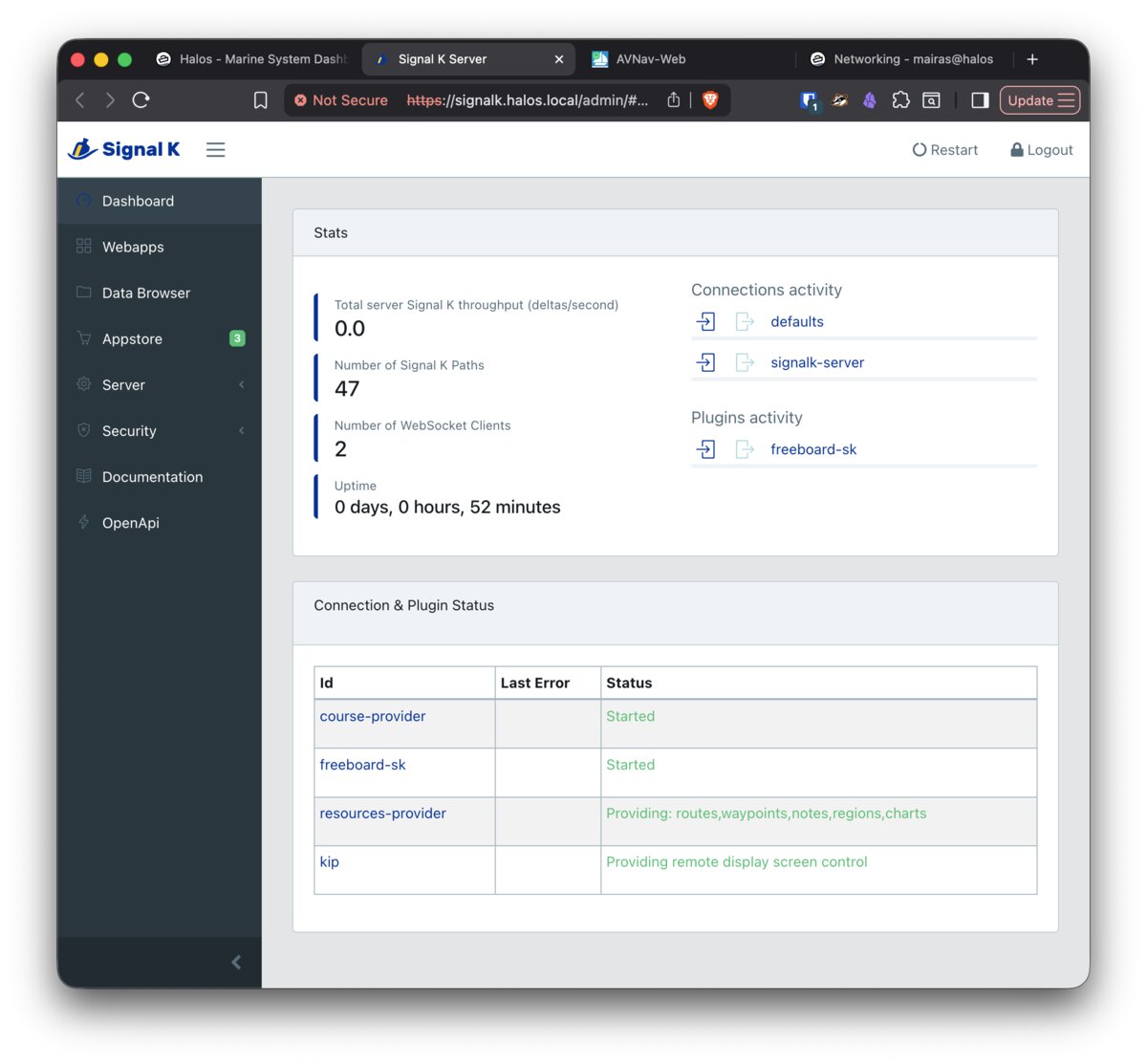
Signal K is an open-source marine data server. It acts as a central hub for all your boat's sensor data:
- Receives data from NMEA 2000 and NMEA 0183 networks
- Provides a unified REST and WebSocket API
- Feeds data to other applications (Grafana, AvNav, OpenCPN)
- Extensible with plugins for additional data sources and integrations
Signal K is typically the first marine app to set up. Connect your NMEA data sources (via CAN bus on HALPI2, USB adapters, or network connections), and other apps can consume the data through Signal K's API.
InfluxDB
URL: https://halos.local/influxdb/
InfluxDB is a time-series database optimized for sensor data. In the marine context, it stores historical data from Signal K — wind speed, boat speed, depth, engine parameters, battery voltage, and any other metrics your instruments produce.
Use InfluxDB to:
- Record long-term trends (fuel consumption over a season, battery health)
- Store data for Grafana dashboards
- Query historical data for analysis
Grafana
URL: https://halos.local/grafana/
Grafana provides dashboards and data visualization. Connect it to InfluxDB to create custom displays for your boat data:
- Real-time gauges (speed, wind, depth)
- Historical charts (engine hours, battery voltage over time)
- Alerts (low battery, high engine temperature)
- Custom dashboards tailored to your instruments
AvNav
URL: https://halos.local/avnav/
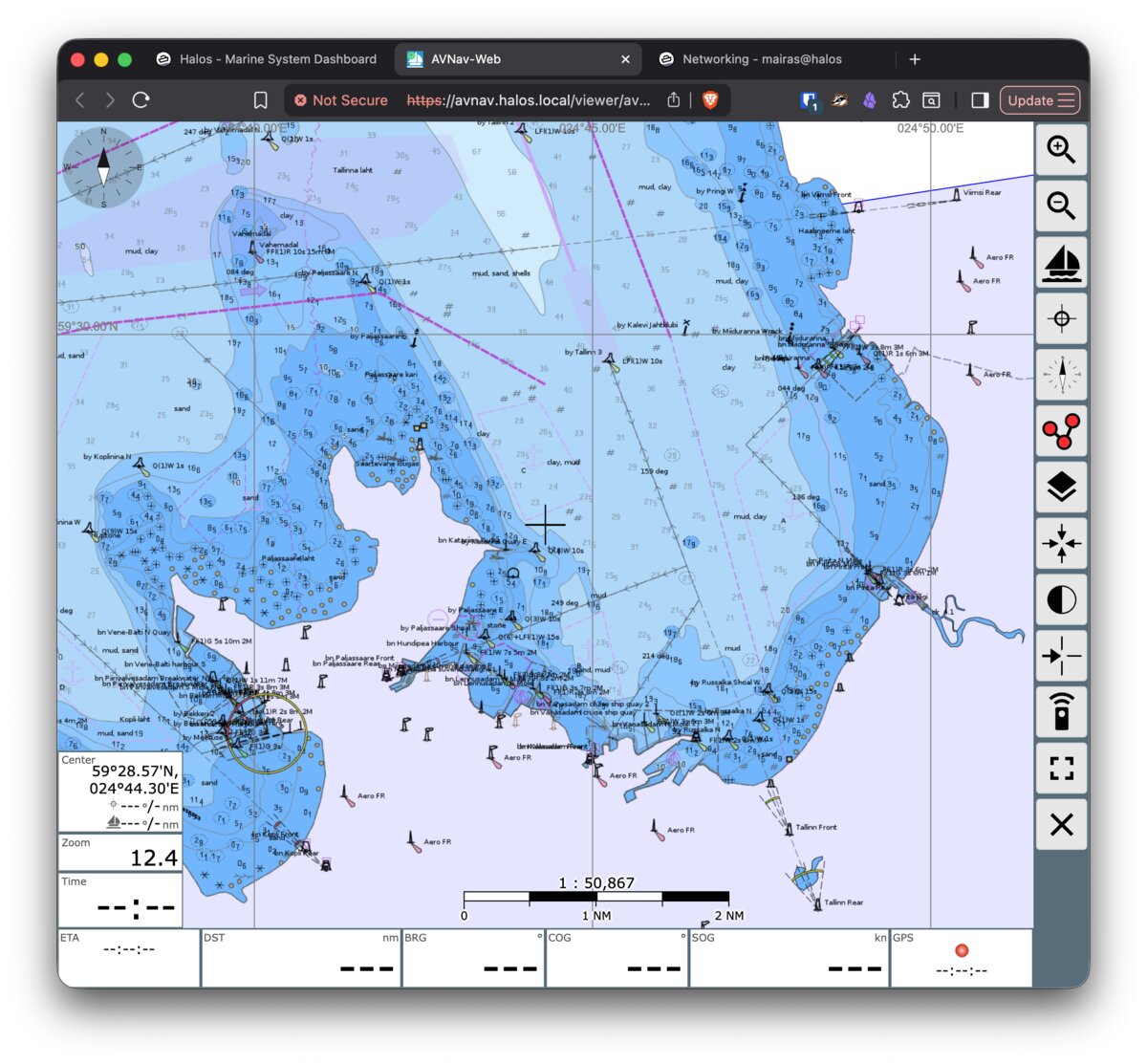
AvNav is a navigation application with chart display and route planning. It reads position and instrument data from Signal K and provides:
- Chart display with multiple chart formats
- Route planning and waypoint management
- Instrument displays (heading, speed, wind, depth)
- Anchor watch alarm
OpenCPN
OpenCPN is a full-featured chart plotter and navigation system with worldwide chart support, AIS display, weather routing, and a large plugin ecosystem.
OpenCPN is primarily a desktop application. On HaLOS Desktop images, install it natively for the best experience:
Or install it via Cockpit → Packages.
Experimental container
An experimental containerized version is available in the Marine App Store (https://halos.local/opencpn/), providing web-based remote desktop access. This is useful on headless images but is not yet production-ready.
Installing marine apps
Marine apps are installed the same way as any other container app:
- Open Cockpit → Container Apps.
- Browse the Marine App Store category or search by name.
- Click an app and select Install.
See Installing Apps for the full workflow.
Data flow
A typical marine setup chains the applications together:
- NMEA instruments send data via CAN bus (NMEA 2000) or serial (NMEA 0183)
- Signal K receives and normalizes the data
- InfluxDB stores historical records (fed by a Signal K plugin)
- Grafana visualizes the data from InfluxDB
- AvNav displays navigation data from Signal K
Migrating from an existing system
If you're moving to HaLOS from an existing marine setup (bare-metal Signal K, standalone InfluxDB, etc.), you can bring your data along. For general information about where container apps store data, see App Data and Migration.
Signal K Server
Signal K stores its configuration in ~/.signalk (typically /home/node/.signalk in Docker or ~/.signalk on bare-metal installs). The directory contains:
settings.json-- server configuration (data connections, plugins, webapp settings)plugin-config-data/-- per-plugin configurationnode_modules/-- installed pluginssecurity.json-- local user accounts and ACLs
On HaLOS, this maps to /var/lib/container-apps/marine-signalk-server-container/data/data/.
Do not copy settings.json
HaLOS generates its own settings.json with settings required for the reverse proxy (e.g., ssl: false and trustProxy: true). Overwriting it will break Traefik integration. Copy only plugin-config-data/ and, if needed, security.json.
You do not need to copy node_modules/ — Signal K will reinstall plugins automatically on the next start based on the plugin configuration.
# 1. Stop Signal K
sudo systemctl stop marine-signalk-server-container

# 2. Copy plugin config from your old system
scp -r user@old-system:/home/pi/.signalk/plugin-config-data /tmp/signalk-migration/
sudo cp -a /tmp/signalk-migration/plugin-config-data \
  /var/lib/container-apps/marine-signalk-server-container/data/data/

# 3. Fix ownership (Signal K runs as UID 1000 in the container)
sudo chown -R 1000:1000 \
  /var/lib/container-apps/marine-signalk-server-container/data/data/

# 4. Start Signal K
sudo systemctl start marine-signalk-server-container
Note
If you were using Signal K's built-in authentication on the old system, those local accounts are in security.json. On HaLOS, authentication is handled by Authelia SSO instead, so local Signal K accounts are not required. You can still copy security.json if you want to preserve them.
InfluxDB
InfluxDB 2.x stores its data in two directories:
- Configuration (
/etc/influxdb2) --influx-configs, bolt database, client settings - Database files (
/var/lib/influxdb2) -- the actual time-series data (engine, WAL)
On HaLOS, these map to:
/var/lib/container-apps/marine-influxdb-container/data/config//var/lib/container-apps/marine-influxdb-container/data/db/
From another InfluxDB 2.x instance
# 1. Stop InfluxDB
sudo systemctl stop marine-influxdb-container

# 2. Copy database files from your old system
scp -r user@old-system:/var/lib/influxdb2/* /tmp/influxdb-migration-db/
sudo cp -a /tmp/influxdb-migration-db/* \
  /var/lib/container-apps/marine-influxdb-container/data/db/

# 3. Copy configuration
scp -r user@old-system:/etc/influxdb2/* /tmp/influxdb-migration-config/
sudo cp -a /tmp/influxdb-migration-config/* \
  /var/lib/container-apps/marine-influxdb-container/data/config/

# 4. Start InfluxDB
sudo systemctl start marine-influxdb-container
Grafana
Grafana stores dashboards, data sources, users, and plugins under /var/lib/grafana. On HaLOS, this maps to /var/lib/container-apps/marine-grafana-container/data/data/.
The key file is grafana.db (SQLite database containing dashboards, users, and data source definitions).
# 1. Stop Grafana
sudo systemctl stop marine-grafana-container

# 2. Copy data from your old system
scp -r user@old-system:/var/lib/grafana/* /tmp/grafana-migration/
sudo cp -a /tmp/grafana-migration/* \
  /var/lib/container-apps/marine-grafana-container/data/data/

# 3. Fix ownership (Grafana runs as UID 472)
sudo chown -R 472:472 \
  /var/lib/container-apps/marine-grafana-container/data/data/

# 4. Start Grafana
sudo systemctl start marine-grafana-container
Note
After migration, you may need to update data source connection URLs in Grafana to match HaLOS's container networking. For example, an InfluxDB data source URL might need to change from http://localhost:8086 to http://influxdb:8086.
Note
HaLOS uses Authelia SSO for Grafana login via OIDC. After migrating, verify that SSO login works. If your old Grafana had local user accounts, they may conflict with OIDC — remove any local accounts that duplicate SSO users.
AvNav
AvNav stores charts, routes, and configuration under /var/lib/avnav. On HaLOS, this maps to /var/lib/container-apps/marine-avnav-container/data/data/.
Note
The source path below (/home/pi/avnav/data/) assumes a bare-metal Raspberry Pi install. If your old system runs AvNav in Docker, the data path will differ — check your compose file's volume mounts.
# 1. Stop AvNav
sudo systemctl stop marine-avnav-container

# 2. Copy data from your old system
scp -r user@old-system:/home/pi/avnav/data/* /tmp/avnav-migration/
sudo cp -a /tmp/avnav-migration/* \
  /var/lib/container-apps/marine-avnav-container/data/data/

# 3. Fix ownership (AvNav runs as UID 1000)
sudo chown -R 1000:1000 \
  /var/lib/container-apps/marine-avnav-container/data/data/

# 4. Start AvNav
sudo systemctl start marine-avnav-container